Feature Release Free Template
Pipefy’s free Feature Release template is a step-by-step process, specially designed to help the Product Management team organize the release of new features. Streamline your feature release process for perfect launch execution all while improving your product and user satisfaction.
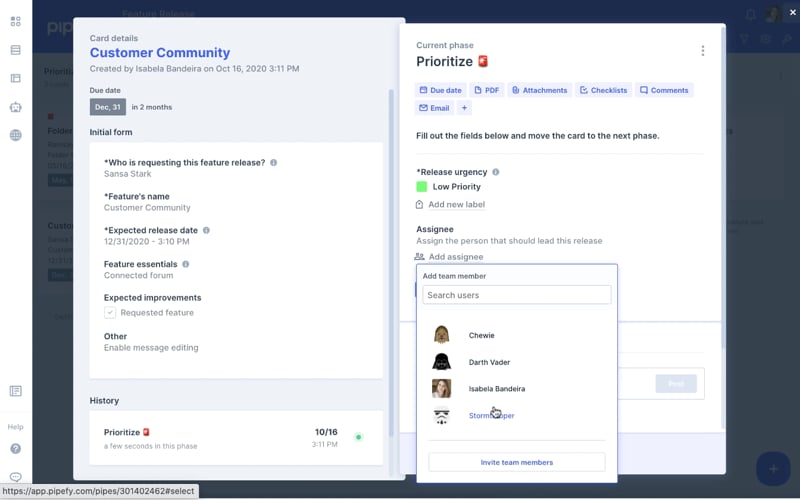
Get more value to your users quickly with an error-proof process
A new release is an opportunity to add more value to your user-base and increase retention and revenue. Implement a standardized and error-proof process that will empower your Product Team to deliver a flawless feature release, every time.
Pipefy’s Kanban board feature gives you full visibility of tasks and allows you to add labels to categorize those with the highest priority or urgency. You’ll have end-to-end release tracking at your fingertips. Project contributors can add comments, attach documents, exchange messages directly in the tool, giving managers the ability to monitor release progress, approvals and blockers in a single place.
Further optimize your process by customizing the template. Automate repetitive workflows such as approval processes and status notifications.
Boost your team’s efficiency for a flawless release
Get full visibility
All of the feature release process tasks will be centralized, so tracking and visibility are available in a single place.
Deliver a consistent performance
Ensure high-quality work, on time. Follow an organized and standardized process.
Customize to save time
Customize your template to automate repetitive tasks and integrate Pipefy to other apps, such as Slack and GitHub.
Everything you need to track and monitor, in a single place
Whether you are introducing new features to current users or new buyer segments, there are a lot of things to consider in a release. With the Feature Release Template, you have a step-by-step plan to optimize and deliver every phase of your release.

Customize the public form to take control of task requests by creating mandatory and conditional fields. Receive, review, and centralize every activity your team needs to cover in one tool so they can focus on delivering a flawless launch, every time.
Boost your feature release process efficiency
Pipefy enables you to standardize the feature release process, improve productivity, and prevent errors. In the Feature Release Template, you will find a step-by-step, ready-to-implement process. Need something a bit more unique to your organization? You have the ability to customize the workflow to reflect your rules and specific needs.
Define priorities, review your communication strategy, and request approvals for the external release. Ensure that standards are enforced, SLAs are met and requirements are executed to the requested details. Optimize your process so release can be made regularly and on time, adding continued value to your customers.


Improve your team’s performance
You can’t improve what you don’t measure, so use data for continuous improvements.
With Pipefy’s Dashboards and Reports features, you can evaluate your process effectiveness. Easily create custom charts with the data you want to follow closely. Extract key metrics like, how much time it takes to finish each task, and your team’s productivity.
This way, you can manage your human and financial resources and optimize your process for future releases.

Adapt this template for your needs and hit the ground running
Fast and simple to deploy
Get started with your process in minutes with this easy-to-use template.
No/low-code
Customize your unique needs without help from the IT department.
Wide app integrations
Connect your ERP, HRIS, CRM, and other existing tools with Pipefy to build a truly integrated operation.
Connect Pipefy to your favorite software with ease



















Teams across the globe love Pipefy





Since we implemented Pipefy, we have been able to control and automate many processes, from operational and simple processes, such as task management, to business processes, such as executive search professionals (a type of service we provide). Our efficiency increased between 30 and 40% after Pipefy’s implementation.
Uelinton Santos COORelated templates

Product Roadmap
Organize roadmap planning in a single place and provide complete visibility to all stakeholders.

Agile Software Development
Develop software quickly using the Agile Methodology with this customizable template.

Bug Tracking and Reporting
Identify and prioritize software bugs all while providing complete visibility to the IT team.
